
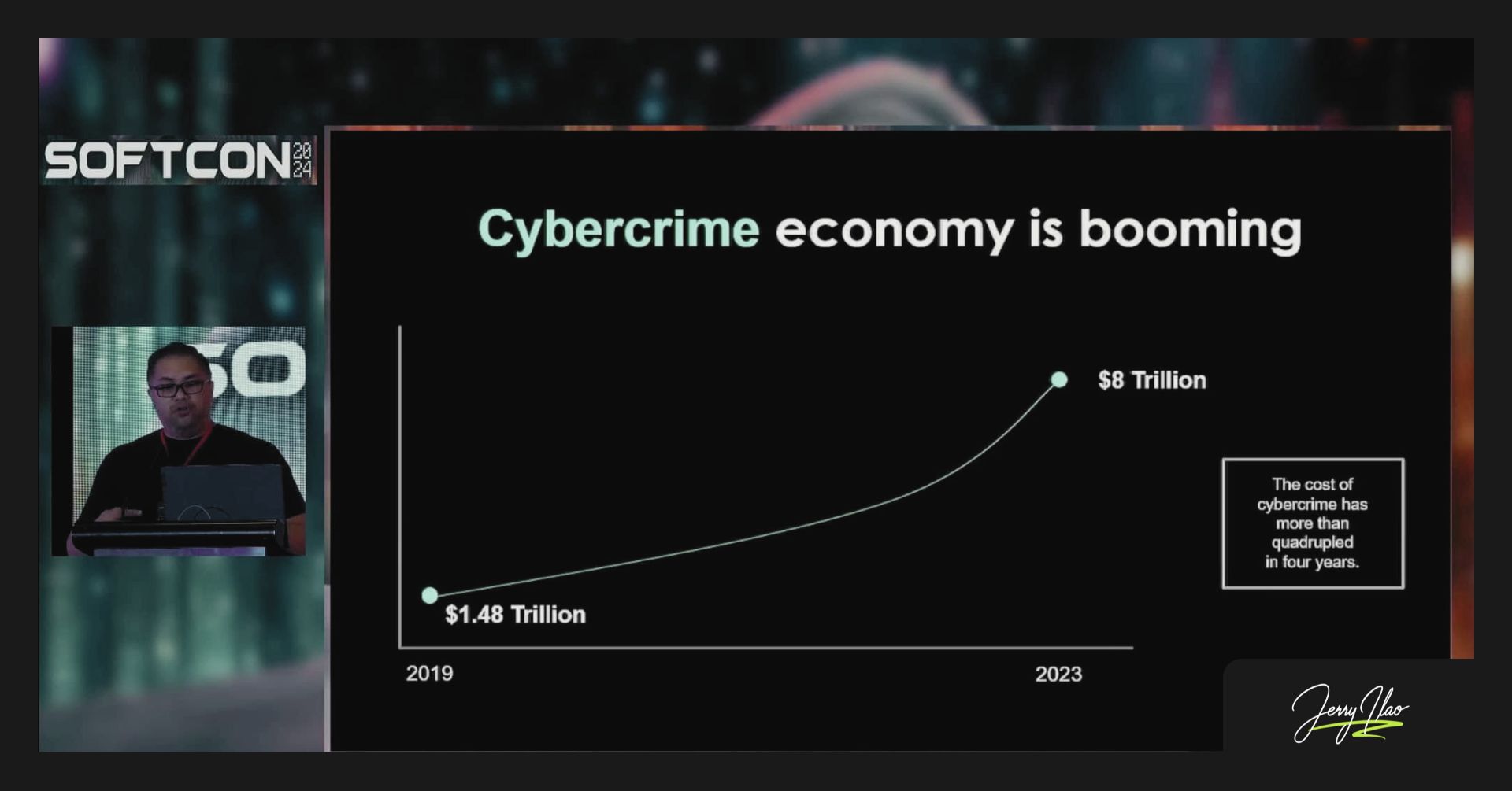

Phishing emails cause 91% of all cyberattacks, according to PhishMe research on 40 million simulated emails. Cybercrime cost the world $8 trillion in 2023, up from an estimated $1.5 trillion around 2018, according to Cybersecurity Ventures. Jowie Alcala, Country Manager of Pax8, shared three practical steps at SOFTCON 2024: check the SLAM method, turn on MFA, and use strong passwords.
Something I’m starting to observe at business events in the Philippines is that the cybersecurity conversation has shifted. It used to feel like a topic for IT teams. Now it shows up at software conferences, SME roundtables, and even casual conversations between business owners who just learned something alarming.
At SOFTCON 2024, held at SMX Aura last October, Jowie Alcala, Country Manager of Pax8, shared a number that made the room pause: 91% of all cyberattacks begin with a phishing email. Not a zero-day exploit. Not some sophisticated breach. Just an email someone clicked.
And that is still worth paying attention to.
The Numbers Are Too Big to Ignore
Cybersecurity Ventures estimates cybercrime cost the world $8 trillion in 2023. That is roughly the GDP of Japan and Germany combined. A decade earlier, that figure was a fraction of what it is today.
What makes this alarming for Filipino professionals and business owners is not the global scale. It is the local entry point. Most of these attacks do not start with nation-state hackers targeting your server. They start with a crafted email that looks like it came from your bank, your supplier, or your HR department.
Phishing works because it targets human behavior, not systems. Someone is busy. The email looks official. The link looks legitimate. One click is all it takes.
Three Steps That Actually Work
At SOFTCON 2024, Alcala laid out three practical steps for improving personal and organizational security. These are not complicated. They do not require a security background. They require habit.
Step 1: Think before clicking — check the SLAM
SLAM is an acronym that helps you evaluate any suspicious email before you interact with it.
S is for Sender. Check the actual email address, not just the display name. Phishing emails often use addresses that look close to the real thing — a missing letter, a swapped domain, a number replacing a letter. The display name can say anything. The email address is where the deception shows up.
L is for Links. Hover before you click. The URL that appears at the bottom of your screen when you hover over a link tells you where it actually goes. A link that says “click here to verify your account” might lead somewhere completely different from where you expect.
A is for Attachments. Be cautious with files you were not expecting. A ZIP file from someone you know can still be malicious if their account was compromised. When in doubt, confirm through a separate channel before opening.
M is for Message. Read the content carefully. Urgency, unusual requests, grammar errors, pressure to act immediately — these are signals. Legitimate organizations rarely ask you to do something critical through email alone without any prior notice.
Running SLAM takes less than thirty seconds. That thirty seconds is the gap between a safe click and a compromised account.
Step 2: Turn on MFA
Multi-Factor Authentication (MFA) is one of the most effective account protections available today, and most of it is free.
When MFA is active, a stolen password alone is not enough to access your account. The attacker also needs access to your phone, your authenticator app, or your secondary email. Most attackers will move on to easier targets rather than go through that extra layer.
Enable MFA on every account that offers it, starting with email, banking, and any business tool you use daily. The setup takes five minutes. The protection is ongoing.
For business owners and team managers, make MFA mandatory across your organization’s accounts. One compromised employee account can expose your entire client list, your financial records, and your business communications.
Step 3: Use strong passwords
A strong password is long, random, and unique to each account. The moment you reuse a password across two accounts, a breach on one becomes a breach on both.
Password managers remove the memory problem. Tools like Bitwarden, 1Password, or even the built-in password manager on your browser generate and store complex passwords so you do not have to memorize them. Your job is to remember one master password. The manager handles the rest.
Avoid passwords built around personal information — your birthday, your child’s name, your company name. These are the first things an attacker who has done basic research on you will try.
Where to Start This Week
If you have not done any of these three things yet, start with MFA on your primary email account. Email is the master key. If your email is compromised, password resets for every other account become accessible to the attacker.
After that, install a password manager and update three to five of your most critical account passwords to unique, generated ones. The SLAM habit builds naturally once you start noticing the signals in your inbox.
You do not have to become a cybersecurity expert. You just have to make it slightly harder for an attacker to get through.
Frequently Asked Questions
What does SLAM stand for in cybersecurity?
SLAM stands for Sender, Links, Attachments, and Message. It is a four-part mental checklist for evaluating suspicious emails before clicking or responding. Checking each of the four elements takes under thirty seconds and catches the majority of phishing attempts.
How to avoid phishing attacks in everyday email use?
The most practical approach is to apply the SLAM method before clicking any link or opening any attachment in an unexpected email. Pair this with Multi-Factor Authentication on your accounts so that even a stolen password cannot be used without a second verification step.
Why do 91% of cyberattacks begin with phishing?
The 91% figure comes from PhishMe research based on 40 million simulated phishing emails sent to approximately 1,000 organizations. Phishing works because it targets human behavior rather than technical systems. Attackers create urgency, impersonate trusted senders, and rely on busy people making fast decisions.
Who is Jowie Alcala and what is Pax8?
Jowie Alcala is the Country Manager of Pax8 in the Philippines. Pax8 is a cloud commerce marketplace that helps managed service providers (MSPs) and businesses acquire and manage cloud solutions. Alcala spoke at SOFTCON 2024, the 12th annual conference of the Philippine Software Industry Association, held at SMX Aura Convention Center in October 2024.
Is MFA really effective against phishing attacks?
MFA significantly reduces the risk from phishing. Even if a phishing email tricks you into submitting your password, the attacker still needs to pass the second verification step, which requires access to your phone or authenticator app. Major platforms including Google, Microsoft, and most banking apps offer MFA for free.
What are the best password practices for small business owners in the Philippines?
Use a password manager to generate and store unique passwords for each account. Never reuse passwords across accounts. Enable MFA wherever it is offered, starting with email and banking. For teams, set a policy requiring unique passwords and MFA on all shared business tools.